Cross-Browser Guide: Preventing Premature Submit During IME Composition When Pressing Enter
Introduction: "Press Enter to Submit" Is Not So Simple
Recently, while reviewing a colleague's PR, I noticed a "press Enter to submit input" feature that forgot to handle the "prevent submission during composition" issue. This causes problems for languages requiring character composition—users pressing Enter while still composing would accidentally submit incomplete text, as shown below:
 (Correct behavior: Pressing Enter during composition ends the composition phase, not submitting. Only after composition ends does pressing Enter submit.)
 (Incorrect behavior: Pressing Enter during composition immediately submits, causing incomplete content to be sent.)
I suggested using the browser's KeyboardEvent.isComposing API to handle this. The concept is: "When the user presses Enter, first check if isComposing is true—if so, they're still composing, so don't submit." Everything seemed perfect until testing revealed Safari still had issues.
After researching and fixing the problem, I'm writing this article to document implementing "press Enter to submit input content while preventing submission during composition" from scratch, covering:
- The naive approach
- Using
isComposingto prevent submission during composition - Why Safari still has issues
- How to fix Safari's composition submission problem
- Do Edge and Firefox have the same issue?
- Summary: How to handle cross-browser composition submission
Beyond code examples, we'll examine the browser composition event specifications to understand why Safari has issues and how to solve them.
The Naive Approach: Submit When Enter Is Pressed
When hearing "press Enter to submit input," the intuitive implementation would be:
/** Pseudocode */
input.addEventListener('keydown', (e) => {
    // When keydown key is Enter
    if (e.key === 'Enter') {
        // send result & clear input
        sendResult(input.value);
        input.value = '';
    }
});
Press Enter, submit the result, and perform any necessary operations. For languages without composition, this works fine—like English.
 (English has no composition concept, so pressing Enter to submit directly works fine)
However, for languages with composition like Traditional Chinese or Japanese, there's a problem: even during composition, pressing Enter submits, causing incomplete results to be sent. This article uses Traditional Chinese for demonstrations:
(Incorrect behavior: Pressing Enter during composition immediately submits incomplete content)
Let's address this composition submission issue.
Using isComposing to Prevent Submission During Composition
To solve the composition submission problem, conceptually we just need to determine: if Enter is pressed while composing, don't submit.
The browser specification provides the KeyboardEvent.isComposing API, letting developers determine if composition is active during keydown. From the MDN documentation:
The KeyboardEvent.isComposing read-only property returns a boolean value indicating if the event is fired within a composition session, i.e., after
compositionstartand beforecompositionend.
This means when compositionstart fires (composition begins), isComposing becomes true; when compositionend fires (composition ends), isComposing becomes false. Simply put, during a composition session, isComposing should be true.
The compositionstart and compositionend concepts are important and will be used later, but let's not expand on them yet. Here's the implementation:
/** Pseudocode */
input.addEventListener('keydown', (e) => {
    // When keydown key is Enter and is not composing
    if (e.key === 'Enter' && !e.isComposing) {
        // send result & clear input
        sendResult(input.value);
        input.value = '';
    }
});
Adding the !e.isComposing check means submission and input clearing only execute when not composing.
Testing in Chrome, everything works correctly:
 (Chrome: Correct—pressing Enter during composition doesn't submit)
But testing in Safari reveals the composition submission issue persists:
 (Safari: Incorrect—pressing Enter during composition submits incomplete content)
Safari strikes again—not surprising at this point. Let's investigate why Safari has issues.
Why Does Safari Still Have Issues?
To understand Safari's problem, let's examine the code we wrote:
/** Pseudocode */
input.addEventListener('keydown', (e) => {
    // When keydown event happened
    // keydown key is Enter and is not composing
    if (e.key === 'Enter' && !e.isComposing) {
        // send result & clear input
        sendResult(input.value);
        input.value = '';
    }
});
The key point is: "When the keydown event fires, isComposing must be true"—otherwise we can't prevent Enter submission during composition. This is a crucial concept not emphasized earlier.
Combined with the isComposing specification: "When compositionstart fires, isComposing becomes true; when compositionend fires, isComposing becomes false."
These integrate to: "When keydown fires, compositionstart must have already fired, but compositionend must not have fired yet" to achieve "pressing Enter while in composition state."
The key is: "keydown must fire before compositionend", or conversely, "compositionend must fire after keydown".
A flow diagram makes this clearer. The expected flow is:
// Current Chrome
[User starts typing to compose] ->
compositionstart fires, isComposing is now true ->
[User sees underlined text indicating composition]

[User presses Enter first time] ->
keydown event fires, key=Enter, isComposing is still true ->
[User sees input content NOT submitted] ->
compositionend event fires, isComposing becomes false ->
[User sees composition underline disappear]

[User presses Enter second time] ->
keydown event fires, key=Enter, isComposing is now false ->
[User sees input content submitted] Perfect!
Observing the Event Log when typing the Chinese character "讚" in Chrome shows correct results:
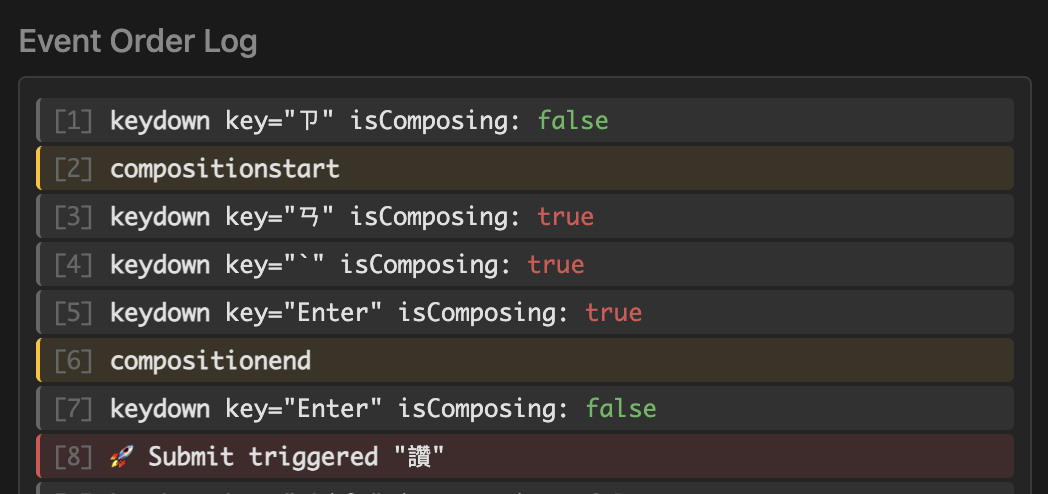 (Chrome correct behavior: keydown and composition Event Log)
We can confirm compositionend fires after keydown.
On the first Enter press, keydown fires first with isComposing still true, so the composing content isn't submitted ([5]). Then compositionend fires, setting isComposing to false ([6]). Pressing Enter again finally submits the completed composition ([7] and [8])—the expected correct result.
But what about Safari? Testing by typing "讚" in Safari shows this Event Log:
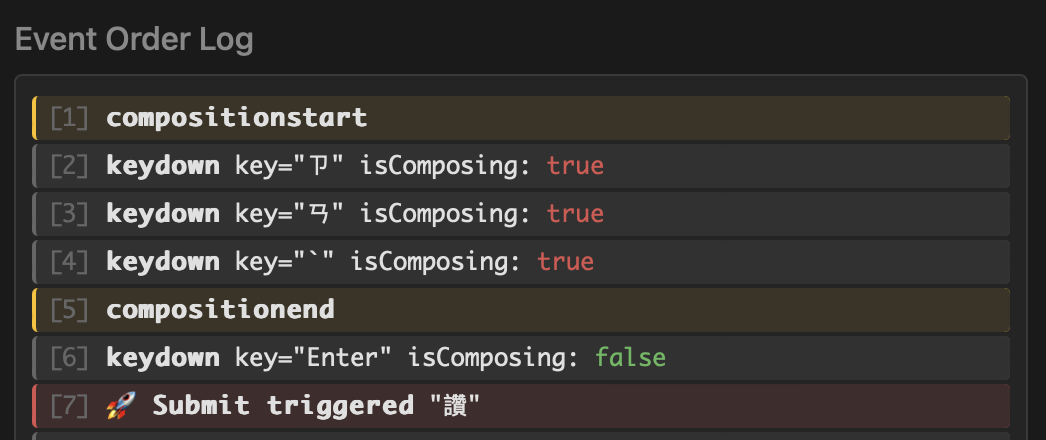 (Safari incorrect behavior: keydown and composition Event Log)
We discover compositionend fires before keydown!
On the first Enter press, compositionend fires first ([5]), setting isComposing to false. Then the keydown Enter event fires ([6]). Since isComposing is already false, the result submits immediately. From the user's perspective, pressing Enter during composition submits the content.
// Current Safari
[User starts typing to compose] →
compositionstart fires, isComposing is now true ->
[User sees underlined text indicating composition]

[User presses Enter first time] ->
compositionend fires FIRST, isComposing becomes false ->
keydown fires AFTER, key=Enter, isComposing is already false ->
[User sees composing content submitted] Bad!
Looking at the W3C 3.8.5. Key Events During Composition specification, it states keydown should fire before compositionend. Chrome's implementation is compliant; Safari's is not:
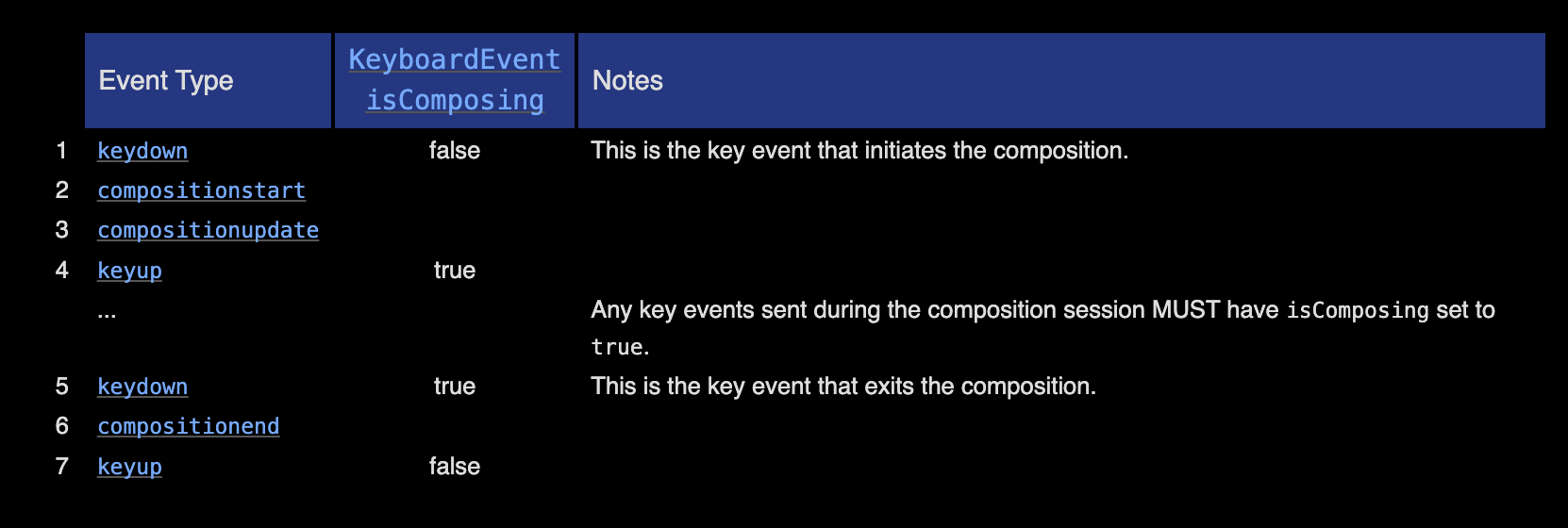 (W3C Key Events During Composition Document)
Now we understand why Safari can't simply use the KeyboardEvent.isComposing API to prevent Enter submission during composition.
Safari implements composition event ordering differently. Theoretically, keydown should fire before compositionend, but Safari fires compositionend before keydown. Thus, when the Enter keydown event fires, isComposing has already been set to false, making it impossible to block submission.
The Webkit Bugzilla issue The event order of keydown/keyup events and composition events are wrong on macOS documents this, and it appears unfixed.
How to Fix Safari's Composition Submission Issue?
Now that we understand the cause, we can find a solution.
Safari's core problem is: "compositionend fires and sets isComposing to false before keydown fires." The solution is maintaining our own isComposingSafe state that:
- Sets
isComposingSafetotruewhencompositionstartfires - Keeps
isComposingSafeastruewhencompositionendfires - Keeps
isComposingSafeastruewhenkeydownfires—crucially, within the current event loop,isComposingSafestaystrue - Sets
isComposingSafetofalseonly in the next event loop afterkeydownfires
Using setTimeout(fn, 0) achieves this by delaying the state change to the next event loop:
/** Pseudocode */

// isComposing state maintained by ourself to resolve Safari bug
let isComposingSafe = false;

// When compositionstart event happened
input.addEventListener('compositionstart', (e) => {
    // set isComposingSafe to true when composition starts
    isComposingSafe = true;
});

// When compositionend event happened
input.addEventListener('compositionend', (e) => {
    // use setTimeout to delay setting false until "next event loop"
    // this keeps isComposingSafe true during keydown event (current event loop)
    // and sets it false only after keydown completes (next event loop)
    setTimeout(() => {
        isComposingSafe = false;
    }, 0)
});

// When keydown event happened
input.addEventListener('keydown', (e) => {
    // keydown key is Enter and is
    // not native composing and
    // not our state composing
    if (e.key === 'Enter' && !e.isComposing && !isComposingSafe) {
        // send result & clear input
        sendResult(input.value);
        input.value = '';
    }
});
This requires understanding the Event Loop concept. If you need a refresher, read Understanding JS Execution Flow: Event Loop.
Observing the Event Log in Safari comparing native isComposing with our custom isComposingSafe:
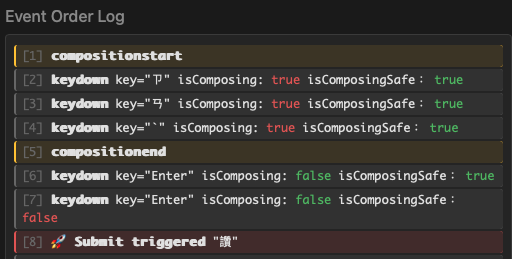 (Safari: Comparing isComposing and isComposingSafe)
The behavior shows:
- First Enter:
isComposingSafeis stilltrue, successfully preventing composition submission - Second Enter:
isComposingSafehas correctly becomefalse, so submission succeeds
This method successfully fixes Safari's premature submission during composition.
I've demonstrated with vanilla JS, but the concept applies to modern frontend frameworks—the key is managing the isComposingSafe state yourself.
Here's a React custom hook example for reference:
// Implementing custom hook to handle it

import { useRef, useCallback } from 'react';
import type { CompositionEvent, KeyboardEvent } from 'react';

/**
 * Hook to resolve Safari's keyboard.isComposing issues.
 *
 * Use this with keydown events you want to listen to, such as Enter key.
 *
 * ```tsx
 * const { onCompositionStart, onCompositionEnd, getIsComposing } = useSafeKeyboardCompositionEvent();
 *
 * <input
 *   onCompositionStart={onCompositionStart}
 *   onCompositionEnd={onCompositionEnd}
 *   onKeyDown={(e) => {
 *     if (e.key === 'Enter' && !getIsComposing(e)) {
 *       onSubmit();
 *     }
 *   }}
 * />
 */

export default function useSafeKeyboardCompositionEvent() {
  /**
  * Custom safe isComposing state
  */
  const isComposingRef = useRef(false);

  /**
   * Composition start event handler
   */
  const onCompositionStart = useCallback(() => {
    isComposingRef.current = true;
  }, []);

  /**
   * Composition end event handler
   */
  const onCompositionEnd = useCallback(() => {
    // Delay resetting to keep isComposing true during keydown event
    // Even if compositionend fires before keydown (Safari bug)
    setTimeout(() => {
      isComposingRef.current = false;
    }, 0);
  }, []);

  /**
   * Check if currently composing
   */
  const getIsComposing = useCallback(
    (e: KeyboardEvent<HTMLElement>): boolean => e.nativeEvent.isComposing || isComposingRef.current,
    [],
  );

  return {
    onCompositionStart,
    onCompositionEnd,
    getIsComposing,
    isComposingRef,
  };
}
There's another solution using keyCode 229. Most browsers set keyCode to 229 during composition:
input.addEventListener('keydown', (e) => {
    // Check: key is Enter, not composing, and keyCode is not 229
    if (e.key === 'Enter' && !e.isComposing && e.keyCode !== 229) {
        sendResult(input.value);
        input.value = '';
    }
});
However, keyCode is deprecated (MDN keyCode deprecated) and browsers may remove support, so this isn't recommended.
Do Edge and Firefox Have the Same Issue?
Having examined Chrome and Safari, what about Edge and Firefox?
Let's type the Chinese character "讚" and observe the Event Logs.
First, Edge—testing shows event order and results match Chrome:
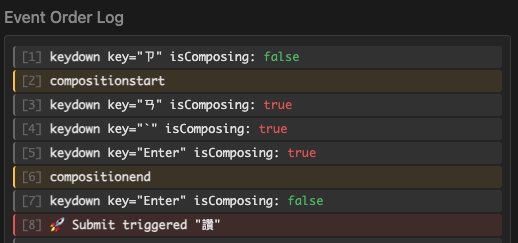 (Edge: keydown and composition Event Log)
The keydown event with e.key=Enter fires first ([5]), then compositionend fires ([6]). Event order matches expectations, so there's no issue. From the user's perspective, the first Enter ends composition, the second Enter submits—as expected.
Firefox is slightly different—the key value differs from Chrome:
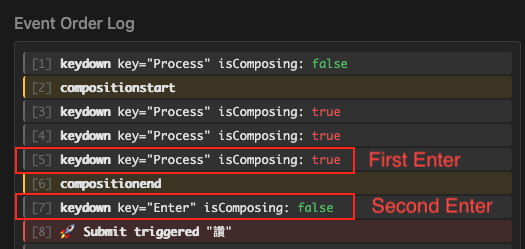 (Firefox: keydown and composition Event Log)
Notice I've marked "first Enter press" and "second Enter press." Interestingly, Firefox sets the event key to Process during composition. So the first Enter shows key as Process, not Enter. Only the second Enter shows the actual Enter key.
That's why I've labeled them clearly. After clarification, Firefox's event order resembles Chrome—both fire keydown before compositionend on the first Enter. The only difference is the event key value.
The conclusion: no issues. From the user's perspective, the first Enter ends composition, the second Enter submits—as expected.
Summary: Handling Cross-Browser Composition Submission
To conclude, here's how to handle cross-browser composition submission issues.
First, don't naively check only if the event key is Enter. Beyond "submit on Enter," you must also consider "don't submit on Enter during composition."
Consider your application's browser support requirements. If you don't need Safari support, you can usually just use KeyboardEvent.isComposing—it works in Chrome, Edge, and Firefox:
/** Pseudocode */
input.addEventListener('keydown', (e) => {
    // When keydown event happened
    // keydown key is Enter and is not composing
    if (e.key === 'Enter' && !e.isComposing) {
        // send result & clear input
        sendResult(input.value);
        input.value = '';
    }
});
However, for Safari compatibility, you must handle Safari's non-W3C-compliant composition event ordering. Simply relying on e.isComposing won't work. Here are two solutions.
Recommended Solution
For reliable cross-browser support, maintain your own isComposingSafe state:
/** Pseudocode */
let isComposingSafe = false;

input.addEventListener('compositionstart', () => {
    isComposingSafe = true;
});

input.addEventListener('compositionend', () => {
    setTimeout(() => {
        isComposingSafe = false;
    }, 0);
});

input.addEventListener('keydown', (e) => {
    if (e.key === 'Enter' && !e.isComposing && !isComposingSafe) {
        sendResult(input.value);
        input.value = '';
    }
});
Key points:
- Manage composition state yourself via
compositionstartandcompositionend - Use
setTimeout(fn, 0)to setisComposingSafetofalsein the next event loop - Even if Safari's
compositionendfires early,isComposingSaferemainstrueduringkeydown, successfully blocking submission
Keep the !e.isComposing check to ensure other browsers work correctly.
If you prefer not to implement this yourself, libraries exist—search or ask AI. But for simple requirements, direct implementation works fine.
Short-Term Solution
Another approach uses keyCode 229. Safari also sets keyCode to 229 during composition:
......

if (e.key === 'Enter' && !e.isComposing && e.keyCode !== 229) {
    // send result & clear input
        sendResult(input.value);
        input.value = '';
}

......
This is much simpler, but keyCode is deprecated and may lose browser support, so it's not recommended long-term. For quick prototypes or short-term projects, it's a viable simple solution.
Additional Thoughts
While researching this topic, I noticed relatively few English articles compared to other topics. This is likely because English-speaking developers rarely encounter composition issues—English doesn't have this concept. I found many Japanese articles, and there are probably many Korean and Chinese articles too. Contributing a Traditional Chinese article on this topic is valuable.
Try testing your frequently used applications in Safari with Traditional Chinese input—you might discover unexpected bugs when pressing Enter during composition! Some applications may only test with English, or simply don't intend to support Safari. XD
For example, Figma's Comment feature has this issue:
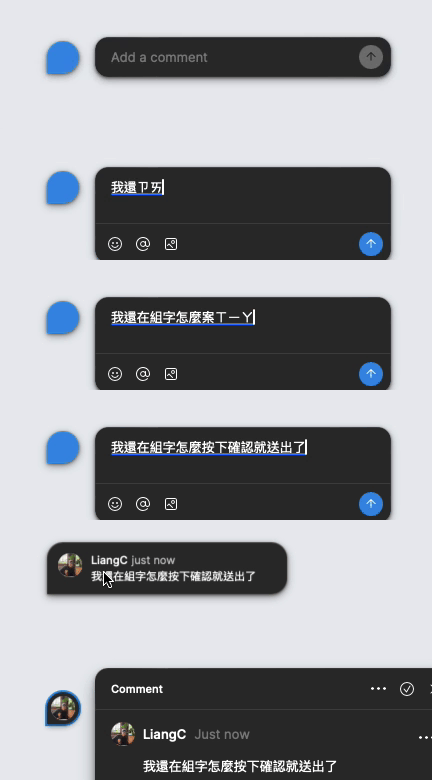 (Figma comments: Using Safari during composition, pressing Enter submits immediately!)
Hopefully Safari will fix this someday!
References
- MDN - KeyboardEvent.isComposing
- W3C UI Events - Key Events During Composition
- WebKit Bugzilla - The event order of keydown/keyup events and composition events are wrong on macOS
- Understanding Composition Browser Events
- SafariでIME確定時のEnterを上手く制御できなかった話
- IME(全角)入力におけるjsイベント現状調査
- Understanding JS Execution Flow: Event Loop
- Proofread with assistance from Claude Opus 4.5